
Stock Your Pantry
Your pantry is the foundation of every recipe RunMyKitchen generates. Tell the AI what’s in your fridge and cabinets, and it builds a structured inventory — organized by category, with quantities and expiration awareness. Setup takes about 5 minutes, and the AI handles all the organizing.
Before you start
Section titled “Before you start”You need a RunMyKitchen account. That’s it. No prep work — just open the app and start talking.
Set up your pantry
Section titled “Set up your pantry”-
Open the chat
Tap the chat icon from any screen. This is your main way to interact with RunMyKitchen — including managing your pantry.
-
Tell it what you have
Type or speak naturally. Go room by room if it helps:
- “In my fridge I have milk, eggs, cheddar cheese, leftover rotisserie chicken, and a bag of spinach.”
- “Pantry has pasta, canned tomatoes, rice, peanut butter, and some granola bars.”
- “Freezer: ground beef, frozen broccoli, ice cream.”
Send as many messages as you want. The AI accumulates everything.
-
Review the organized pantry
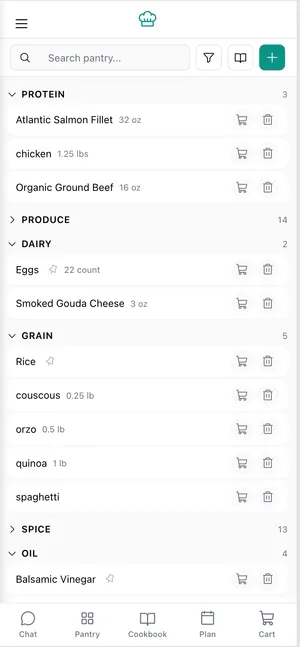
After you send your items, the AI categorizes them automatically — proteins, dairy, produce, grains, canned goods, frozen. Tap Your Pantry to see the full list.
-
Fix anything that looks off
Spot an error? Just say it: “Actually, that’s parmesan not cheddar” or “Remove the granola bars.” The AI updates instantly.
-
Check your staples
RunMyKitchen auto-includes common staples like salt, pepper, oil, butter, garlic, and onions. Review these in the Staples section and customize to match your kitchen.
What you learned
Section titled “What you learned”- Your pantry lives in the chat — just tell the AI what you have
- Items are auto-categorized into fridge, pantry, and freezer groups
- Common staples are included by default so recipes always work
- You can correct or remove items conversationally
Next steps
Section titled “Next steps”- Upload a receipt to add groceries faster
- Add items during the week as you shop
- Customize your staples to match what you actually keep on hand
- Get recipe ideas based on what’s in your pantry