
Order Missing Ingredients
Your meal plan is set. Your shopping list is ready. Now one tap sends every missing ingredient to Instacart — delivered from your favorite local store, not a warehouse.
Place your order
Section titled “Place your order”-
Open your shopping list
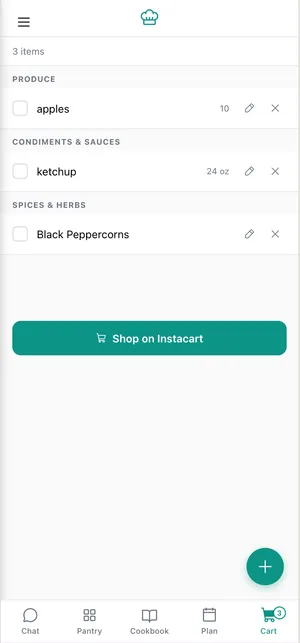
From your meal plan, tap Shopping List. You’ll see every missing ingredient organized by category. Review the list — remove anything you don’t need, add custom items if you want.
-
Tap “Order on Instacart”
One button at the bottom of the list. Tap it.
-
Your store is pre-selected
If you’ve set a default store in Settings, Instacart opens directly at that store — no extra step.
Haven’t set one yet? Instacart shows every available store near you: Sprouts · Wegmans · Harris Teeter · Publix · Food Lion · Lowes Foods · Fresh Market · Target · Aldi — and more, depending on your area. Pick one and keep going, or save a default so you never have to choose again.
-
Review your Instacart cart
RunMyKitchen matches each ingredient on your list to a real product at your selected store. You’ll see exact product names, quantities, and prices. Swap brands or sizes if you prefer — the cart is fully editable in Instacart before you check out.
-
Check out and schedule delivery
Pick a delivery window that works for you — same-day, next-morning, or scheduled. Complete checkout through Instacart. Your groceries arrive from the store you chose.
What you’re paying
Section titled “What you’re paying”You pay Instacart’s standard prices and delivery fees — the same as if you’d opened Instacart yourself and added items one by one. RunMyKitchen doesn’t mark up prices or add hidden fees.
We earn a small referral fee from Instacart when you order through us. That’s how we keep the app free of ads and data selling. More on that in How Shopping Works.
Next steps
Section titled “Next steps”- How Shopping Works — How ingredients get matched to store products, and why we chose this model.
- Your Shopping List — Edit, customize, and manage your list before ordering.